Using the FTE Checklist (click the image below or see link at the bottom of this article to download), each school should verify their applicable FTE related information prior to the submission period opens for the survey. If any issues are found they should be corrected as soon as possible.
The FTE Checklist lists several reports that are useful for verifying FTE before submitting it to DOE. In this article we covered step-by-step each part of the checklist.
Enrollment Discrepancies Report
To access this report go to Florida Reports > Enrollment Discrepancies Report.
You should have no students appearing in the enrollment discrepancies report. Students who are on this report may not be sent for the survey and must be corrected. This report will show the following common errors:
- Students with missing attendance calendars on the enrollment screen
- Students missing a grade level on the enrollment screen
- Students who do not have a primary school on the enrollment screen (all enrollment lines for the year are marked Second School)
DOE Data Verification Reports
To access these reports go to Florida Reports > DOE Data Verification Reports.
The DOE Data Verification reports are a tool for schools to check their data for errors before the survey begins. All errors with (Reject) will not load in the database and those with (Validation) may result in null FTE, so it is critical that all of these errors be cleaned up. Those marked with (Exception) are just there to indicate that there might be an issue but it may not be a problem.
If you have any difficult correcting specific errors you can contact your MIS team for help.
Teacher's Verify Print Class List
To access this report go to Scheduling > Print Class Lists.
Since FTE is generated from student schedules, these schedules should be “settled” as soon as possible each semester! The more changes you are making close to FTE time, the more possibility of errors that may cause your school to lose money and possibly staffing positions.
FTE Administrators should be aware of the Master Schedule of their teachers and of their students’ individual schedules. Having teachers check their class lists provides an extra measure that students are where you think they are (reality versus what is on paper).
DEOs can and should print Class Lists to be verified by teachers. FTE Admins should oversee that teachers are checking and returning this verification back to the DEO in a timely manner.
Attendance Verification Sheets
To access this report go to Attendance >Verification Sheets/Sub Rosters.
During the 11-day Attendance Window, teachers should be taking careful attendance each day. It is important that any students who withdrew before the survey period are marked appropriately in Focus on the enrollment screen as those students cannot be claimed for FTE.
FTE Admins or Data Entry Operator should verify that teachers are taking attendance (use the Attendance > Teacher Completion Report for this).
Focus provides this tool which allows the districts to maintain hard copy records of the automated attendance system for state auditing and monitoring purposes. Typically once attendance data has been finalized in Focus, these verification sheets are printed for the attendance window for Survey 1-4 and signed-off on by the teachers.
Select the teacher(s), Period(s), and timeframe for this report. Focus allows you to select the formatting of this report in addition to an option to ignore empty classes.
Once you have made your selections, click Print/Preview.
This report will show the students assigned to the teacher(s) for the selected period and timeframe along with the attendance codes for those students. You have the option of including a signature line (recommended) for the teacher(s) when you run this report.
FTE Admins should verify that teachers are checking the Attendance Verification Sheets provided to them by the DEO and that these are being returned to the DEO in a timely manner and that the teacher, DEO or Attendance Secretary (depending on your school) are making appropriate changes when necessary.
FTE Admins should be aware of any students that are being recorded as absent for “all” of the 11-day window these students will earn 0 FTE.
Principal Verification
|
********************************************************** * CERTIFICATION OF AUTOMATED STUDENT ATTENDANCE REGISTER * * FOR DISTRICT NAME ( 9999 ) * FTE SURVEY PERIOD: (X ) YYYYMMDD THRU YYYYMMDD **********************************************************
IN ACCORDANCE WITH THE DOE ATTENDANCE MANUAL (ATTENDANCE RECORD KEEPING SYSTEM). THE PRINCIPAL HAS THE RESPONSIBILITY FOR CERTIFYING THE COMPLETENESS AND ACCURACY OF THE AUTOMATED STUDENT ATTENDANCE REGISTERS. PLEASE CERTIFY THE ACCURACY OF THESE REPORTS BY SIGNING BELOW AND MAINTAIN THESE REPORTS FOR FTE AUDIT PURPOSES. ____/____/____ ____________________________________ DATE NAME AND TITLE |
The principal (or the principal’s designee) has the responsibility for certifying the completeness and accuracy of the automated student attendance records. The school must have formal written internal control procedures describing how the certification is conducted and monitored.
Once the 11 day attendance verification sheets are printed, verified and signed by the teachers, the above statement should be printed on the school district letterhead and have the principal verify and sign the verification sheets. These hard copy records and copied and maintained for at least 3 years or until all applicable audits have occurred.
Bus Driver's Complete Ridership Worksheets
To access this report go to Florida Reports>Bus Rosters.
Bus Ridership (Attendance) Worksheets must be completed and signed by bus drivers for the 11-day attendance window, and students who did not ride the bus during the attendance window must be marked as non-riders in Focus.
The worksheets must provide the following information, at a minimum:
- District Number
- Name of School
- Survey Number
- Fiscal Year
- Year-Round/Extended School Year Indicator
- Days In Term
- Transportation Membership Category
- Vehicle Category
- Name of Bus Operator
- Bus Number
- Route/Trip Number
- Student Name
- Student Grade
- Student Number (FLEID)
- Date(s) the student rode
- Operator Signature
- Operator Signature Date
Bus operator worksheets should be neat, legible and complete (including a signature)
Completed worksheets should be reviewed, verified and signed by a supervisor
Although hardcopies of driver worksheets with original signatures are preferred, school districts who maintain scanned, electronic student database reports may use similar approved reporting formats for transportation record keeping. These formats must be coordinated with the district MIS.
The worksheets must be retained for at least 3 years or until all applicable audits have occurred.
Courses Marked Exclude from FTE
To access this report go to District Reports > PAEC Reports > School > Exclude from FTE School Wide. This report will show you any courses or student schedules which have been marked as Exclude from FTE for the current year. It is important to verify this information as these are courses that will NOT be sent to FLDOE whatsoever in the survey. All of the courses that appear on this report should be non-instructional such as homeroom, recess, lunch etc. There are some less common cases where a course may be marked exclude, but staff should be aware of that reasoning and keep some notes of it.
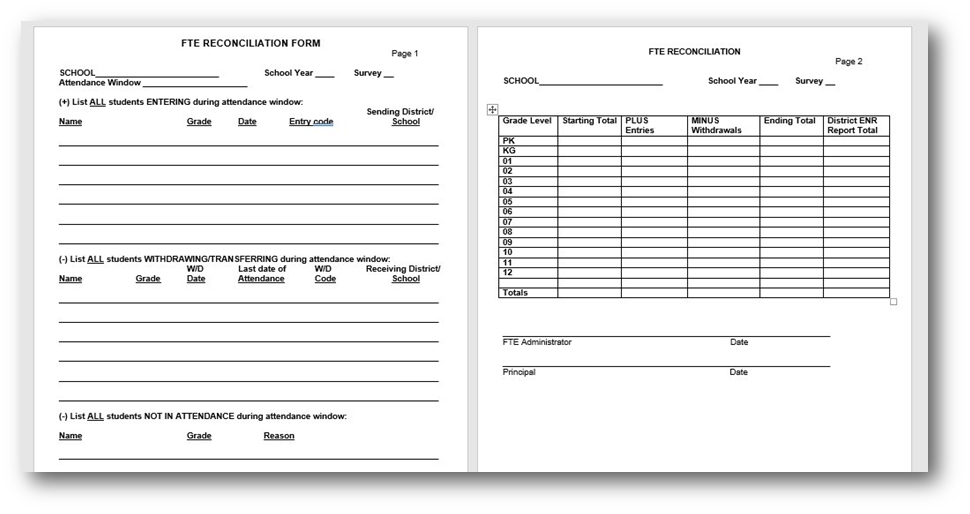
FTE Reconciliation Form
To access this report go to District Reports > PAEC Reports > School > FTE Reconciliation.
Starting on the day before the attendance window schools should capture enrollment from the report on the FTE Reconciliation Form (click the image below to download the form), the link to download this form is at the bottom of this article. Beginning the first day of the window they should track entries and withdrawals of any students on the form for the entire 11-day window.
On date certain, schools should verify the reconciliation forms. The totals from the form should match the updated reconciliation report when they run it.
FTE Null Students Report
To access this report go to Florida Reports > FTE Null Students.
FTE Null Students report is used to view students who have invalid data or attendance issues and are currently receiving no FTE. This report allows users to review the students and student data in order to correct the invalid information. Set the parameters and survey information in order to generate the report.
Examples of issues would be student showing nulled schedule record 1950 mins research shows that the student was dismissed from ESE services and FEFP was set to 999 but schedule was not updated.
Print FTE Detail for Students with less that 1500 minutes
To access this report go to Florida Reports > Print FTE Detail. Check the box Only Show Students with less than 1500 minutes.
Check each student showing less than 1500 minutes to make sure that their schedule is complete and the number of minutes is correct.
Please note: when using the Print FTE Detail Report using the Recalibrated FTE option, there is no way Focus can calculate it if the student is shared with another district, however if they aren't this should be the recalibrated value that DOE returns. When using Capped Focus will stop calculating FTE once the student hit's .5. So to compare the two, recalibrated adjusts all courses total FTE output to so the sum is .5, and capped calculates the FTE value and once we hit .5 the remaining courses would basically get 0 FTE.
FTE Summary Report
To access this report go to Florida Reports > FTE Summary Report.
This report will show you the student count and expected FTE for the survey by FEFP code. Review the student counts and FEFP codes to make sure the numbers look accurate for your school.
Survey Accuracy Report
To access this report go to Florida Reports > Survey Accuracy Report.
Use this report to fill in the numbers on the bottom of the FTE checklist. Have the special areas person for your school verify the counts against their records and sign off.